Traditional 3D CAD software often requires complex keyboard shortcuts and precise mouse movements, creating a steep learning curve for new users. As developers working on 3D visualization tools, we asked ourselves: what if you could manipulate 3D models as naturally as you handle physical objects?
This led us to develop an innovative 3D CAD viewer that combines the precision of traditional controls with the intuitive power of hand gesture recognition, all built with Python and modern computer vision.
Project overview: a multi-modal interaction system
Our solution is a comprehensive 3D visualization platform that features:
- Advanced 3D rendering using both OpenGL (for performance) and Matplotlib (for compatibility)
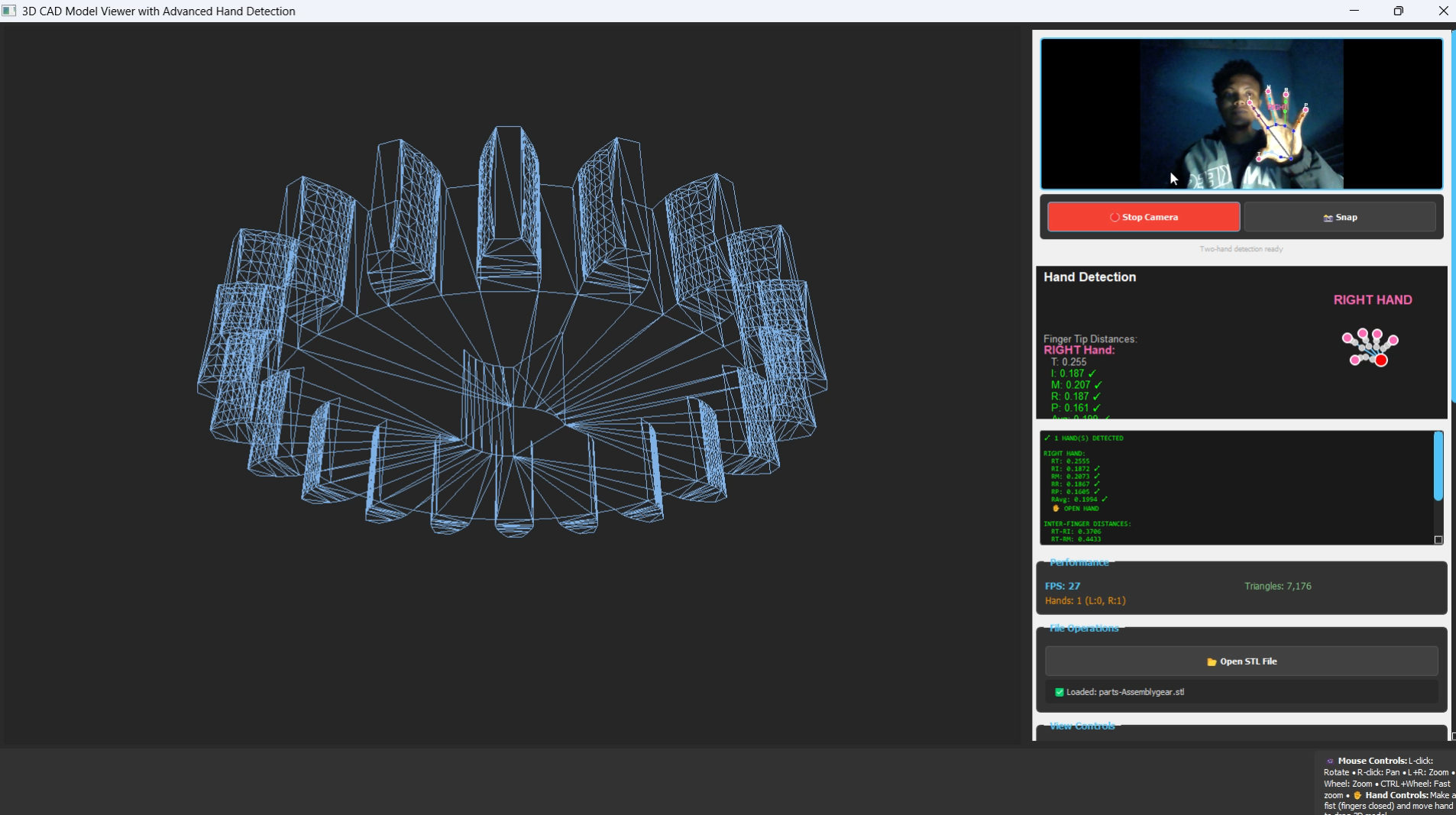
- Real-time hand gesture recognition via MediaPipe and OpenCV
- Dual interaction modes: traditional mouse controls plus intuitive hand gestures
- Responsive UI with camera preview and hand skeleton visualization
- Professional-grade features: undo/redo, performance metrics, model statistics
Core technical architecture
**1. Dual rendering engine.** The system chooses the best rendering backend, ensuring compatibility across different hardware while maximizing performance where possible. On high-performance systems, OpenGL provides smooth animation at 60 FPS with dynamic clipping planes for large models. Where OpenGL is not available, Matplotlib offers a compatible fallback with interactive mouse controls.
**2. Intelligent hand gesture pipeline.** The hand recognition system tracks up to two hands at once, calculating:
- Fingertip distances to detect open and closed fist states
- Hand center positions for panning control
- 3D orientation angles (pitch, roll, yaw) for intuitive rotation
- Inter-hand distances for two-handed zoom
Smoothing algorithms keep the control stable and free of jitter, so gesture interaction feels natural and responsive.
**3. Gesture state machine.** Gesture states are managed with priority-based activation. Two-handed zoom takes precedence over single-hand gestures, and smooth state transitions with debouncing prevent accidental activations. Each gesture type has its own sensitivity tuning.
Interaction paradigms
**Natural hand controls**
- Single fist: make a fist and move your hand to rotate and pan the 3D model
- Two hands: spread your hands apart to zoom in, pinch together to zoom out
- Real-time visual feedback with a live hand skeleton overlay and clear gesture indicators
**Enhanced mouse controls**
- Smart momentum: models keep moving after release, simulating physical inertia
- Zoom to point: CTRL+scroll zooms toward the cursor for precise inspection
- Multi-button combinations: left+right click gives instant zoom without switching modes
Performance optimization
- Weighted averaging for hand position smoothing, where recent positions carry more weight
- Velocity-based momentum with gradual deceleration for fluid movement
- Display lists with pre-compiled OpenGL commands
- Vertex array objects to reduce CPU-GPU communication
- Dynamic detail scaling with automatic triangle reduction for large models
- Backface culling to skip invisible polygons
- Asynchronous camera processing so the UI never blocks
- Adaptive layouts that rearrange panels based on window size
Key features
**Model analysis:** triangle and vertex counts, precise bounding box dimensions, automatic center point calculation, and intelligent auto-scaling and centering.
**Control systems:** traditional sliders for rotation, pan, and zoom with reset and undo; zero-calibration hand tracking with adaptive sensitivity and dead-zone filtering; and visual feedback with performance monitoring, hand skeleton visualization, and distance measurement displays.
**Technical implementation:** ModelViewer3D as the 3D rendering core, CameraPreview as the hand detection engine, HandVisualizationWidget for gesture feedback, ResponsiveControlPanel as the unified control interface, and MainWindow for application orchestration.
Real-world applications
- **Engineering and manufacturing:** intuitive model inspection on factory floors, collaborative design reviews, and training simulations for equipment operation
- **Design and education:** interactive art installations with 3D elements, STEM tools for spatial reasoning, and virtual prototyping
- **Healthcare and accessibility:** assistive technology for users with limited mobility, surgical planning visualization, and rehabilitation therapy tools
Development challenges and solutions
- **Latency in gesture response:** a 7-frame smoothing window with weighted averaging reduces jitter while keeping the response quick.
- **Cross-platform compatibility:** dual rendering backends (OpenGL/Matplotlib) and dependency-aware feature activation.
- **Complex gesture recognition:** a multi-layered detection system combining fingertip distance analysis, hand orientation calculation, and state-based gesture classification.
- **Performance optimization:** display lists, vertex buffers, and adaptive detail levels based on model complexity.
Future roadmap
- Enhanced gestures such as swipe, grab, and rotate
- Multi-user collaboration with shared viewing sessions
- AR integration, projecting 3D models into real-world environments
- Voice commands for hybrid voice and gesture interaction
- Screenshot and model export
- A plugin system for custom features
Technical requirements
- PyQt5 for the user interface
- NumPy for numerical computation
- OpenGL or Matplotlib for 3D rendering
- NumPy-STL for STL file support
- OpenCV and MediaPipe for computer vision and hand detection
The system degrades gracefully when dependencies are missing, with fallbacks and clear notices about unavailable features.
Conclusion: the future of 3D interaction
This project shows that the future of 3D visualization is not only about better graphics, but about more intuitive interaction. By bridging digital controls and natural human movement, we created a tool that makes 3D model manipulation accessible to a wider audience.
- Natural gesture controls can coexist with traditional interfaces
- Python's ecosystem provides robust tools for computer vision and 3D graphics
- Performance optimization is crucial for real-time gesture recognition
- Modular design enables cross-platform compatibility and future expansion
Technology should adapt to humans, not the other way around.
Dites-nous ce qu’il vous faut et un ingénieur vous répondra.